How ECC keeps changing while S/4HANA is built
Your teams change ECC exactly as they do today. S4 RetrofitBox carries each change onto your converted S/4HANA code. One of your reviewers approves it, and one of your developers pulls it into S/4.
Three systems, one direction of travel
The box sits between ECC and S/4 inside your network. It never connects to SAP.
ECC development system
Each BAU change is exported to the box automatically. Nothing changes in how you release, and the box never connects to ECC.
The box
One container on one Linux VM in your network. It carries each change onto the S/4 code, holds the review queue and keeps every record.
S/4 development system
The box is given your converted code once, at onboarding. After that, a developer pulls approved code into S/4. That pull is the only write to SAP, and a person makes it.
The same SID on both sides is fine. SAP's transport management requires a unique SID for every system in a transport domain. S4 RetrofitBox has no such requirement, so an S/4 system that kept the ECC system's SID needs no rename and no workaround. The same holds whichever route built the S/4 system, SAP's DMOVE2S4 included.
From an ECC change to S/4, in five steps
One transport is one unit of work, called a Retrofit. A person approves it before anything reaches S/4.
The original change
A developer changes ECC under a transport, exactly as today.
Exported automatically
The change reaches the box without anyone copying, re-keying or attaching anything.
S4 RetrofitBox
The box carries the change onto your converted S/4HANA code, adapts what S/4 requires and checks the result. What it cannot settle, it hands to a person.
A human reviewer approves the merge
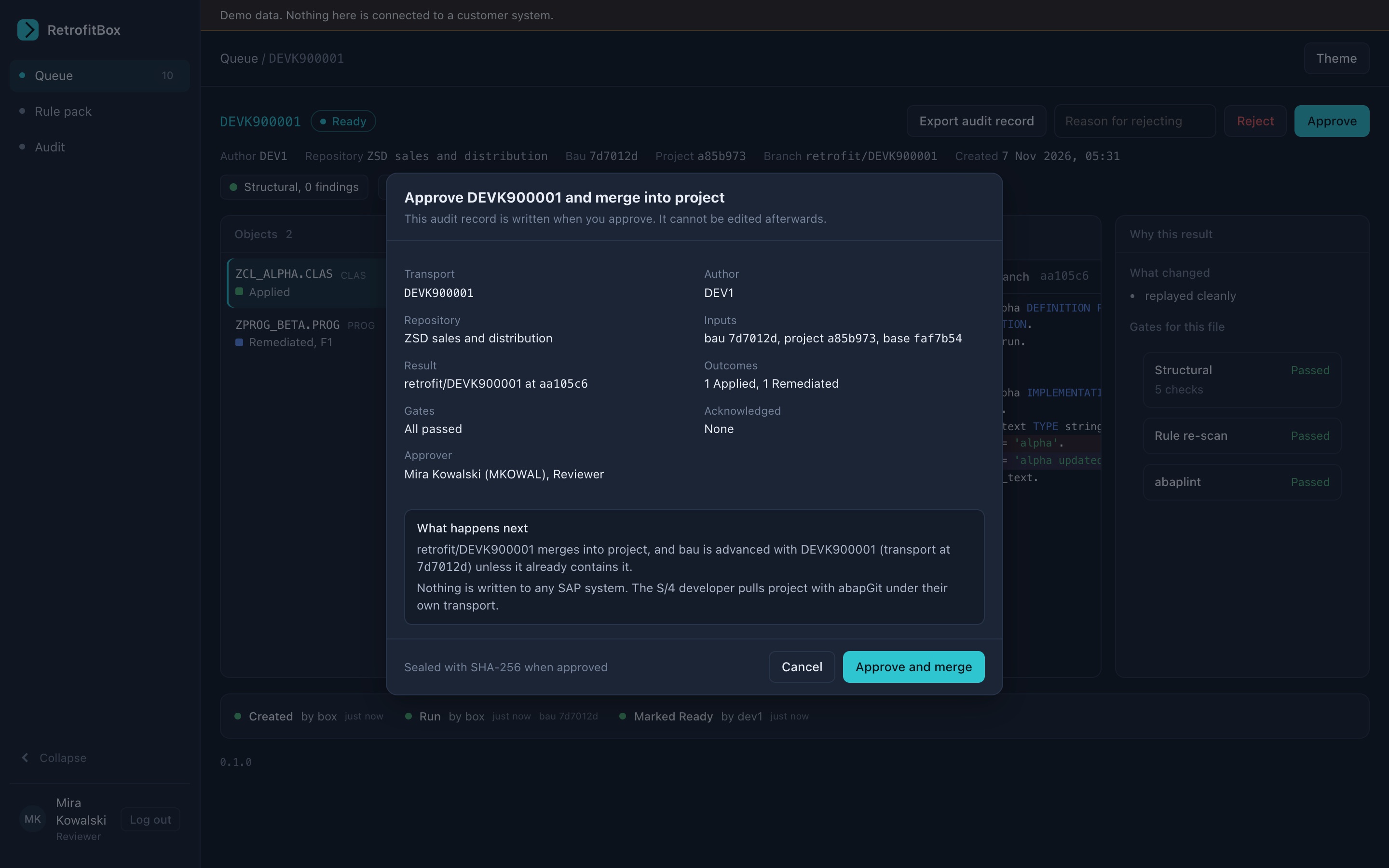
A reviewer who did not write the change sees what changed and why, can finish anything left open, and approves or rejects.
Pull to S/4
A developer pulls the approved code into S/4 under their own transport. Nothing else writes to SAP.
Five outcomes, each with a reason
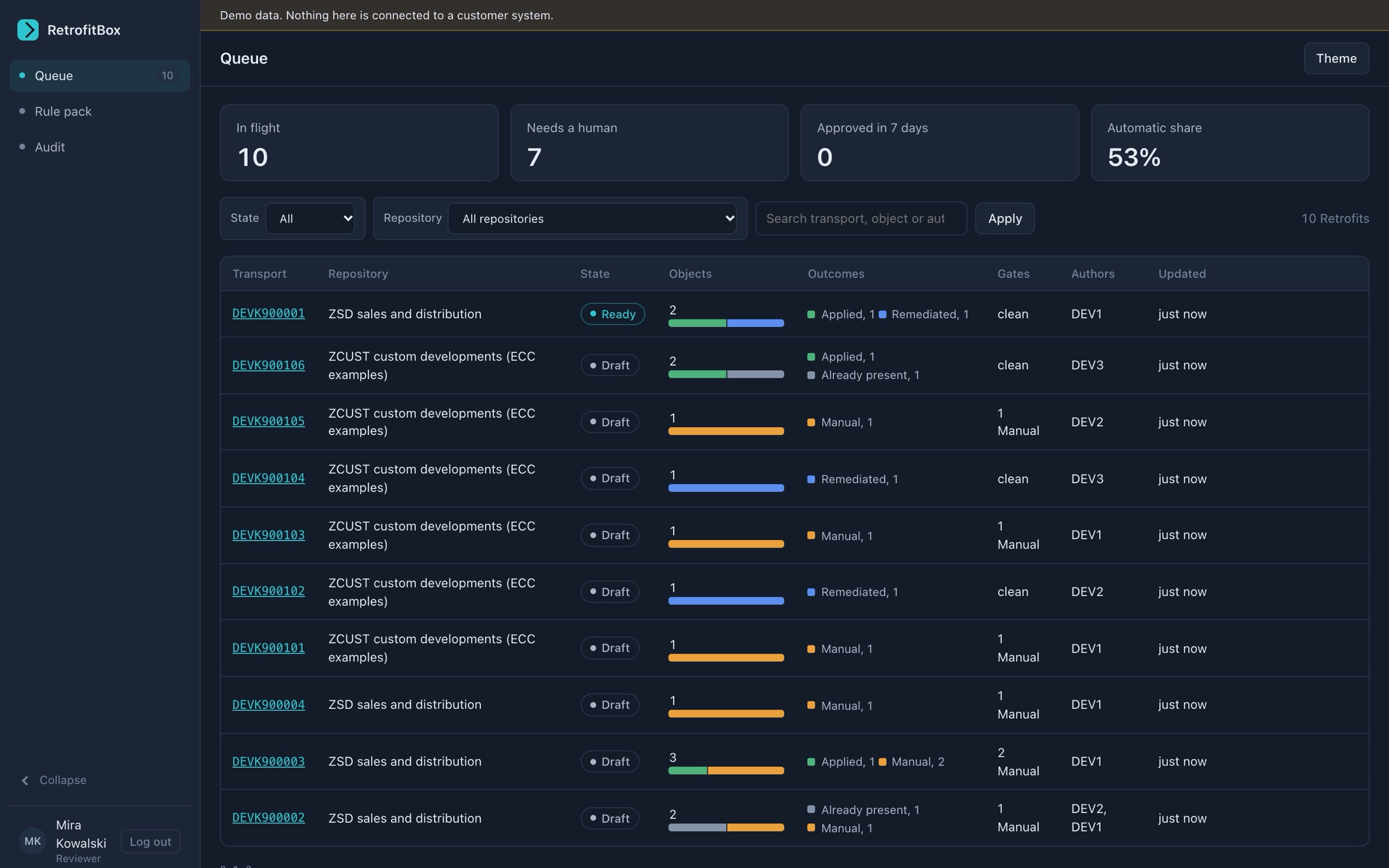
Each object gets exactly one outcome and a recorded reason. Only Manual blocks approval.
- Applied
- The change carried onto the S/4 code cleanly, with nothing to adapt.
- Already present
- The S/4 code already has this change, for example because the conversion team made the same fix. Nothing is written twice.
- Remediated
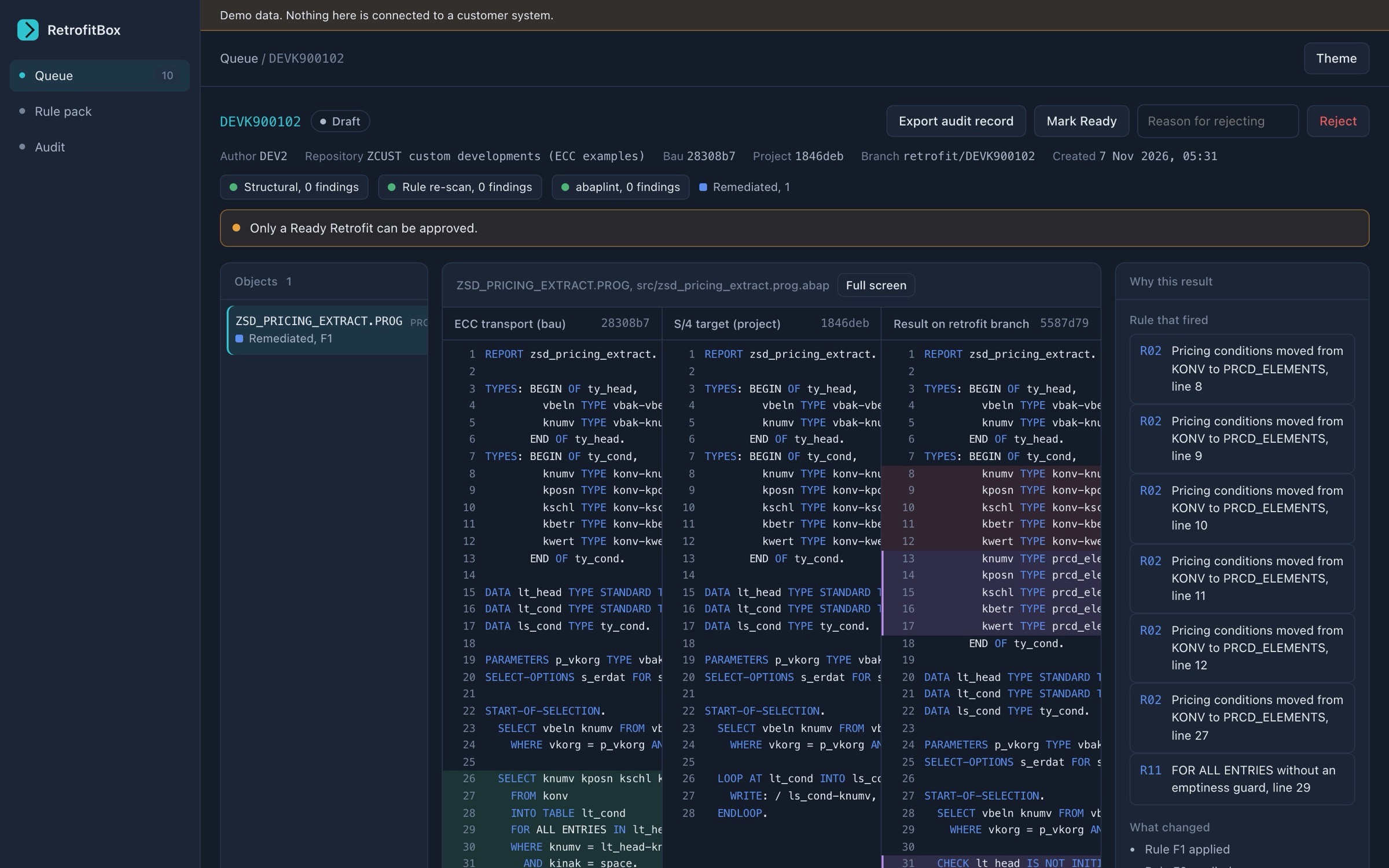
- Applied, then adapted for S/4.
- Resolved conflict
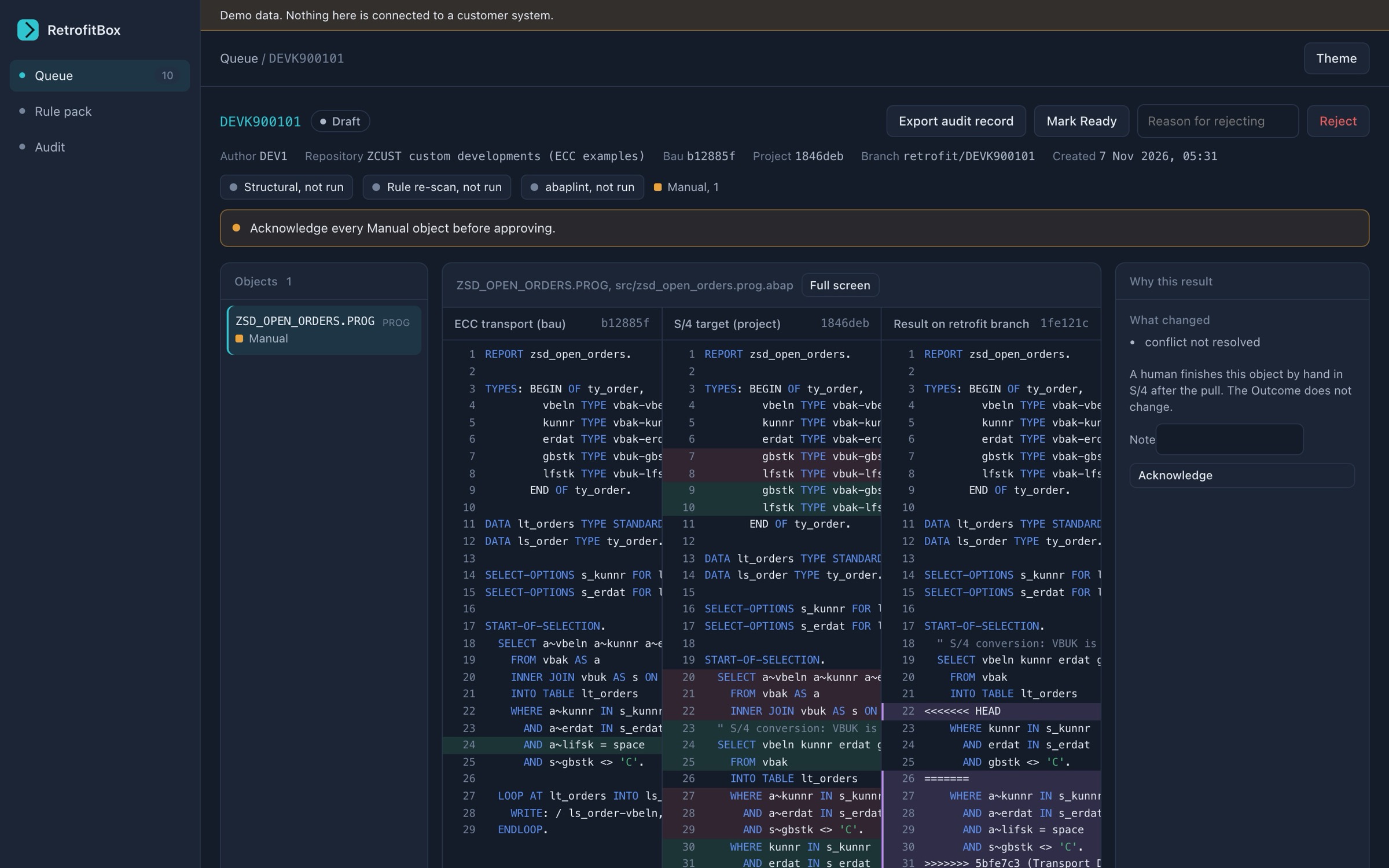
- Both sides had changed the same code, and your model reconciled them and passed every check. The reviewer still approves it.
- Manual
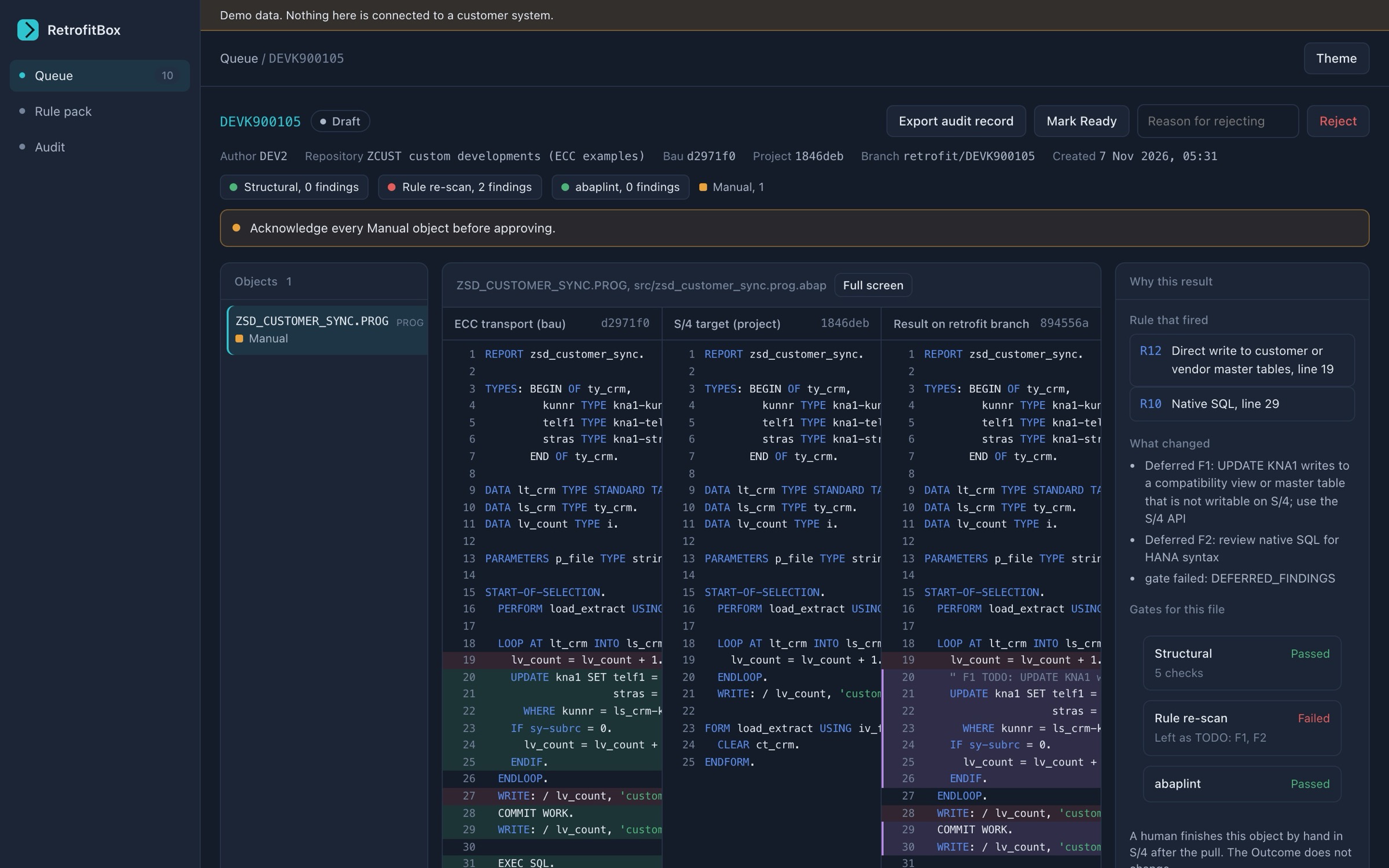
- Needs a person. The reviewer finishes it in place, and the checks run again.
S/4 rules built in
The box ships with rules for common changes that S/4HANA requires of ECC code. Where a change is mechanical, the box makes it and marks every line it touched. Where it needs judgement, the box leaves it for a person and says why.
The rule list, and what the box does with each rule, is in the pilot pack. Ask for it when you request a pilot.
AI with your own key, or none at all
The model only sees ABAP source that the box could not settle on its own. Its answer is checked like every other change, and a person approves the Retrofit.
The box runs the same flow with no key: what it cannot settle goes to a person.
- What is sent
- Only ABAP source the box could not settle on its own. Nothing goes to the vendor, and there is no telemetry.
- If the model is unsure
- Nothing is written and the object goes to a person.
- Checks
- Every AI result is checked like any other change. One that fails is not applied.
- Providers
- Anthropic, OpenAI and Azure OpenAI, with your key. A private OpenAI-compatible endpoint is on the roadmap.
- Where code goes
- The only outbound call is to the endpoint you configure. With a hosted provider, the code in that call leaves your network. The key is redacted from logs and errors.
Product tour
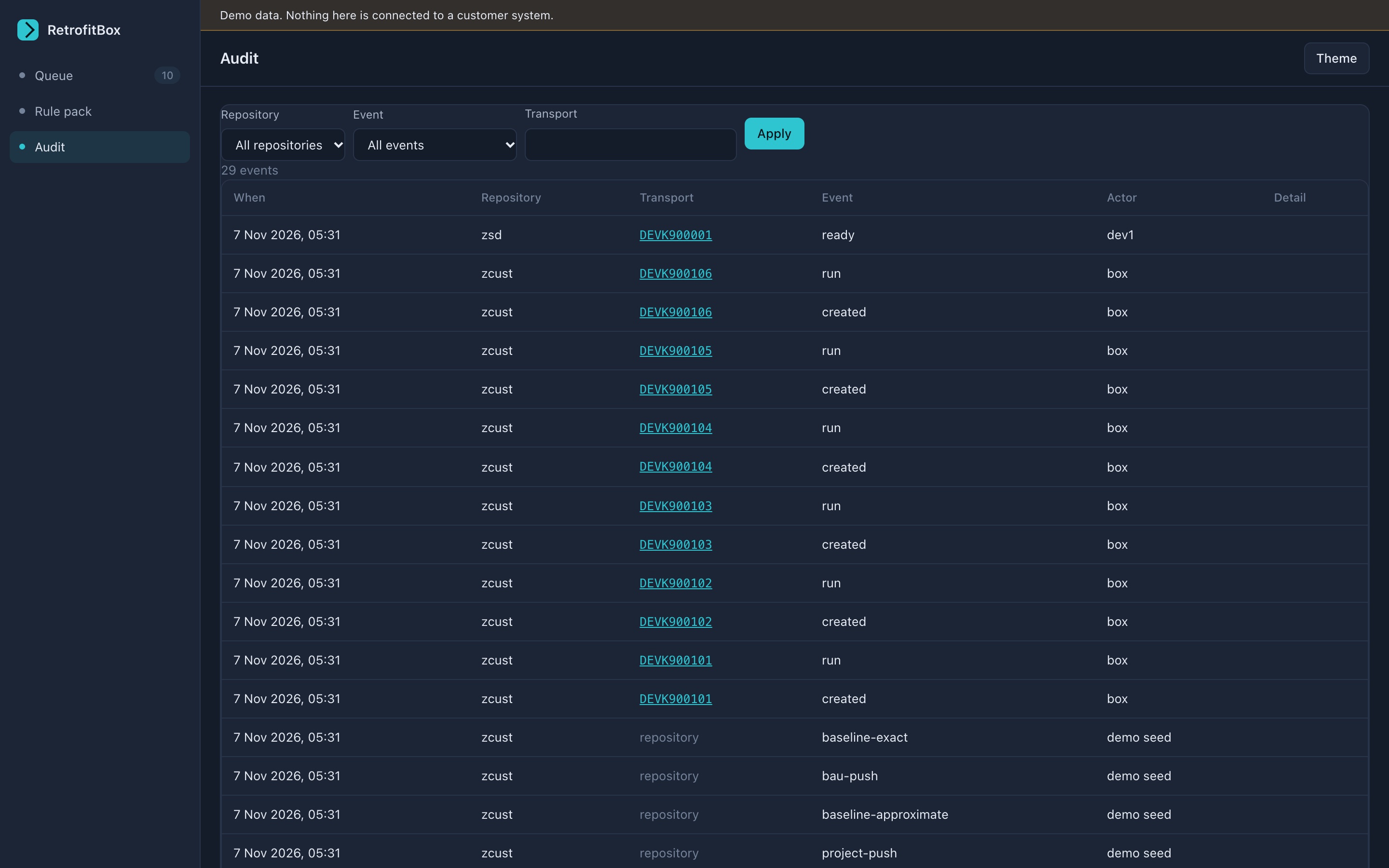
Real screens from the review queue, in demo mode with invented data. Nothing on them comes from a customer system.
After cutover, the same queue keeps working
A conversion ends. Two code lines changing at once does not: a release upgrade, a refactoring project, a rollout or a permanent project line puts you back in the same position. The box that carries ECC fixes carries those changes too.
S/4HANA release upgrades Roadmap
The maintenance line keeps taking fixes while the upgraded line is built. The box carries each fix onto the upgraded line, following your own list of what the new release renamed or replaced, and hands what it cannot settle to a person. The box does not ship that list.
Clean core refactoring Roadmap
Classic code keeps changing while it is moved to released APIs. The box carries each change across and runs a small starting set of ABAP Cloud readiness checks. It is not a full clean core check.
Project streams and rollouts Roadmap
One fix, several target lines. Each target line has its own queue, review and approval. A target line counts as a repository in the licence.
Maintenance and project landscape Roadmap
A production support line and a project line that both stay, on the same release. Each fix released on the support line is carried onto the project line, with the same review and approval. Code only: customising transports are not carried, and in this landscape they are the larger half of the work.
Sync to your Git provider Roadmap
Custom code normally sits inside the SAP system and nowhere else. The box can copy the code and its history to a repository on your GitHub, GitLab, Bitbucket or other Git service, so your own tooling and source-control policy see it. The copy goes from the box, never from SAP, and it is one way. Off by default. It copies code only, so it is not a backup of the box.
The four scenarios are built and tested, and the live demo shows each one on invented code. The sync is built and has been tested against GitHub with a private test repository of our own, and against no other provider yet. None of the five is in the pilot release yet, so each is marked as roadmap.
Two dates from SAP. S/4HANA moved to a two-year release cycle with the 2023 release, with seven years of mainstream maintenance for each release (SAP News, 15 September 2022). If the tool that keeps your support and project lines in step runs on SAP Solution Manager: its mainstream maintenance ends on 31 December 2027, and SAP describes extended maintenance to the end of 2030 as an option for selected functionality (SAP Support Portal, read 15 November 2026).
Build status
Each capability is either in the pilot release or on the roadmap. Nothing on the roadmap is sold as available.
| Capability | Status |
|---|---|
| Receiving code from ECC and S/4, with separate access for each system | Pilot release |
| Carrying each change onto the converted S/4 code | Pilot release |
| S/4 rule pack | Pilot release |
| AI help with what the rules cannot settle, with your key | Pilot release |
| Automatic checks on every result | Pilot release |
| Retrofit records | Pilot release |
| Offline licence check | Pilot release |
| Browser review queue | Pilot release |
| Side-by-side review | Pilot release |
| Approve, reject and acknowledge | Pilot release |
| Edit in place | Pilot release |
| Audit log and audit export | Pilot release |
| Local accounts and roles | Pilot release |
| Demo mode | Pilot release |
| Installer and support bundle | Roadmap |
| A further mode for carrying changes | Roadmap |
| Private OpenAI-compatible model endpoint | Roadmap |
| Checks that span more than one repository | Roadmap |
| Hosted tenant | Roadmap |
| S/4HANA release upgrade scenario: built, not yet in a release | Roadmap |
| Clean core refactoring scenario, with a starting set of checks: built, not yet in a release | Roadmap |
| Target lines for project streams and rollouts: built, not yet in a release | Roadmap |
| Maintenance and project landscape scenario, code only: built, not yet in a release | Roadmap |
| Single sign-on | Roadmap |
| Sync to your Git provider: built, not yet in a release | Roadmap |
| Tamper-evident audit log: built, not yet in a release | Roadmap |
| Alternative export for ECC systems that cannot take the add-on | Roadmap |
| Independent security review and penetration test: not yet carried out, scheduled before production use | Roadmap |
Scope in v1 is repository objects: programs, classes, interfaces, function groups and dictionary objects. Customising is out of scope.